
Want to install Android 14 on your Xiaomi Mi Mix 2S? You are in the right place. This comprehensive, step-by-step guide walks you through the complete process of flashing the unofficial Pixel Experience ROM custom ROM on the Xiaomi Mi Mix 2S (codename: polaris).
Even though Xiaomi has ended official software support for the Mi Mix 2S (which shipped with Android 8 Oreo and received Android 10 as its final update), you can breathe new life into this Snapdragon 845-powered device with Android 14. This custom ROM delivers the latest Android features, improved performance, better battery optimization, enhanced privacy controls, and a clean AOSP stock Android experience.

Why Install Android 14 on Mi Mix 2S?
The Xiaomi Mi Mix 2S (released April 2018) was a flagship smartphone powered by the Qualcomm Snapdragon 845 processor with 6GB RAM and a sleek 5.99 inch IPS LCD display. Despite being a capable device, Xiaomi ended official software support at Android 10 (MIUI 12.5), leaving users stuck on outdated software with potential security vulnerabilities.
Installing Android 14 via Pixel Experience ROM gives your Mi Mix 2S a second life with:
Protection against current known vulnerabilities and exploits.
AOSP-based ROMs are usually leaner and faster than stock firmware.
Android 14 power optimizations can improve battery efficiency.
Run newer apps that require recent Android API levels.
Android 14 Key Features You'll Get on Mi Mix 2S
Android 14 on Mi Mix 2S with Pixel Experience ROM delivers a modern Android experience. Android 14 adds practical upgrades across security, personalization, and performance. Here are the major features you can use after flashing this build:
Lock Screen Controls
Power Efficiency
Ultra HDR Media
Material Personalization
Permission Hardening
Multitasking Improvements
Important Warnings — Read Before Installing Android 14
Device-specific ROM: This Android 14 custom ROM is ONLY for the Mi Mix 2S. Do not flash it on any other device — it will brick your device.
Brick risk: Carefully follow every step in the correct order. Incorrect installation — such as flashing the wrong file, interrupting the process, or skipping the wipe — can permanently brick your Mi Mix 2S. TheUpgradeGuide is not responsible for any damage.
Complete data wipe: Installing this custom ROM erases everything on your Mi Mix 2S — apps, photos, contacts, messages, and files. Create a complete backup before proceeding.
Battery requirement: Charge your Mi Mix 2S to at least 50–60% before starting. An accidental shutdown during the flashing process can leave your device in a non-bootable state.
Warranty void: Unlocking the bootloader and installing a custom ROM will void your manufacturer warranty.
Pre-Installation Requirements for Mi Mix 2S
Make sure you have all of the following ready before starting the Android 14 installation on your Mi Mix 2S:
Unlocked bootloader: Your Mi Mix 2S must have an unlocked bootloader. Use Xiaomi’s official Mi Unlock Tool if you haven’t done this. The process requires linking your Mi account and waiting approximately 7 days.
TWRP Recovery installed: You must have TWRP Recovery installed on your Mi Mix 2S. Watch TWRP installation tutorial for Mi Mix 2S →
Full data backup: Back up all important data — photos, contacts, messages, app data, WhatsApp chats, and files — before starting the installation. Consider using Google Backup and Google Photos for cloud backup.
USB drivers installed: Install the appropriate USB drivers on your PC/Mac. These are needed if you’re using ADB/Fastboot for any part of the process.
XDA Forum Thread: Pixel Experience ROM for Mi Mix 2S — XDA Forum (1) → | Pixel Experience ROM for Mi Mix 2S — XDA Forum (2) →
Always check this XDA Forum thread for the latest build updates, known bugs, required patches, firmware requirements, and community feedback before installing.
Download Android 14 ROM & GApps for Mi Mix 2S
Pixel Experience ROM ROM (AOSP-Based Android 14) for Mi Mix 2S
Google Apps (GApps) for Android 14 ARM64 – Choose One Package
Not sure which GApps to pick? Read our complete GApps compatibility guide ->
Quick Installation Overview
Short on time? Here’s the 5-step summary of how to install Android 14 on your Mi Mix 2S. Scroll down for the detailed guide with screenshots.
- 1Download the Pixel Experience ROM Android 14 ROM & GApps for Mi Mix 2S.
- 2Boot your Mi Mix 2S into TWRP custom recovery mode.
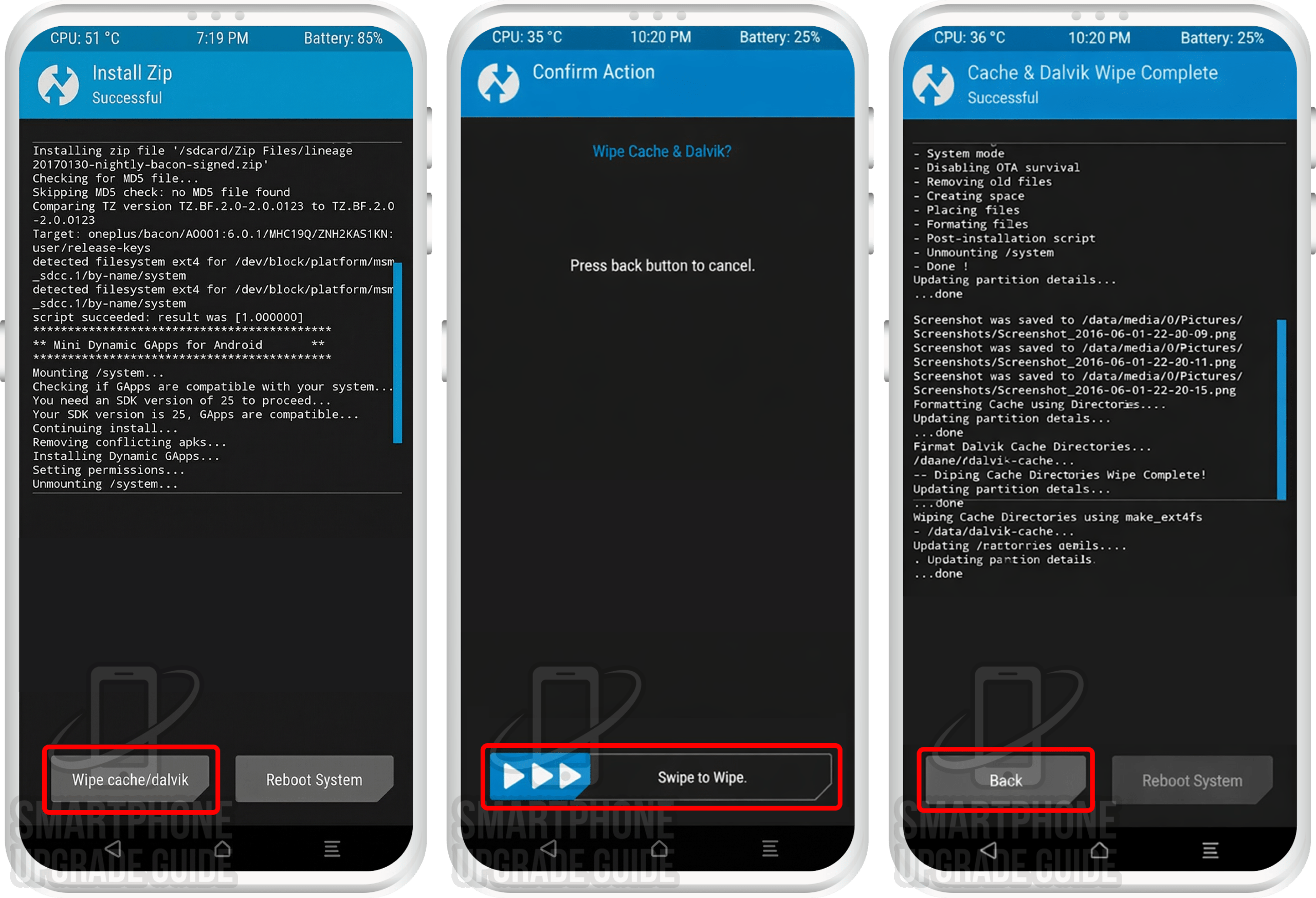
- 3Wipe system, vendor, data, cache, and dalvik cache partitions.
- 4Flash the Android 14 ROM zip followed by the GApps zip via TWRP Install.
- 5Wipe cache, reboot, and enjoy Android 14 on your Mi Mix 2S!
Step-by-Step: Install Android 14 on Mi Mix 2S
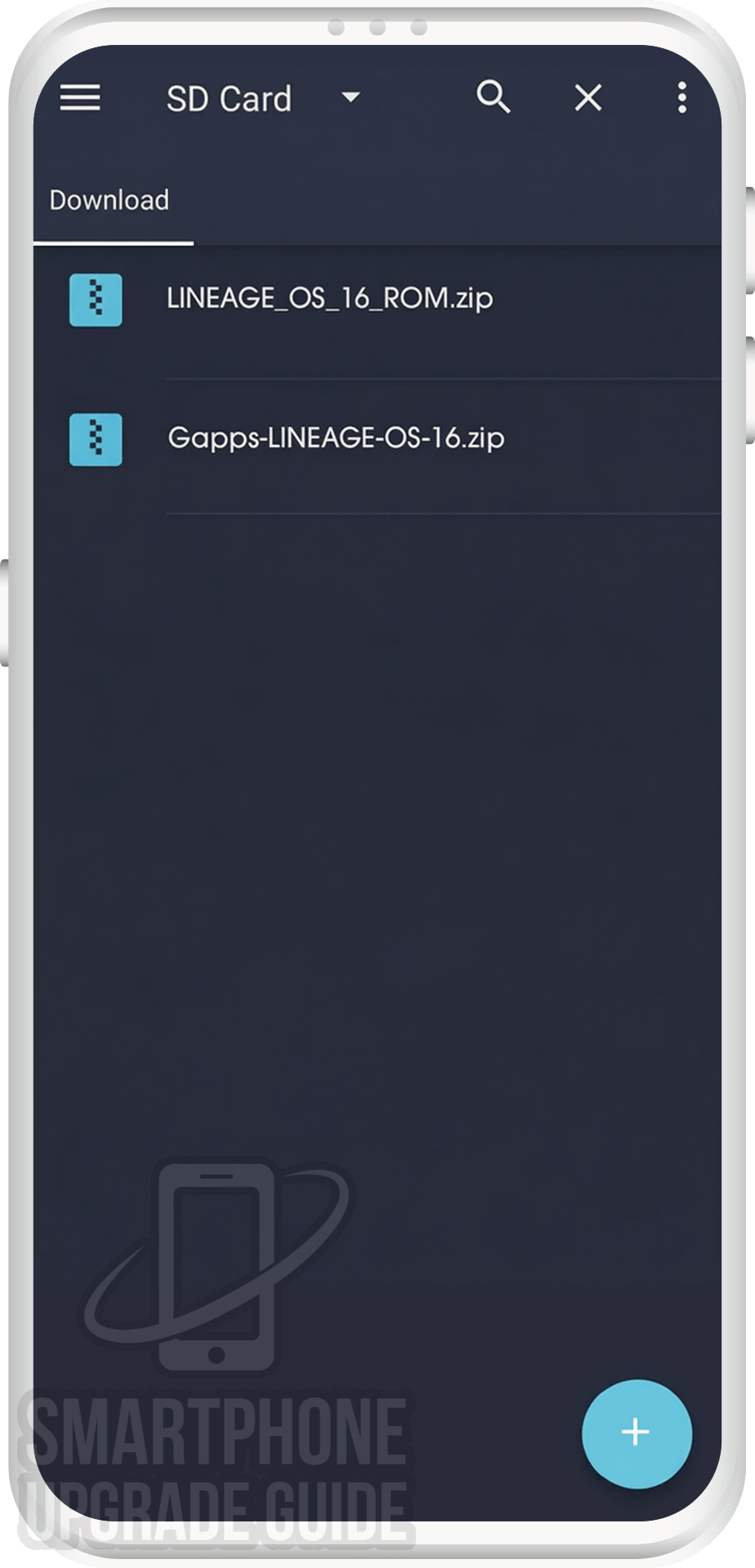
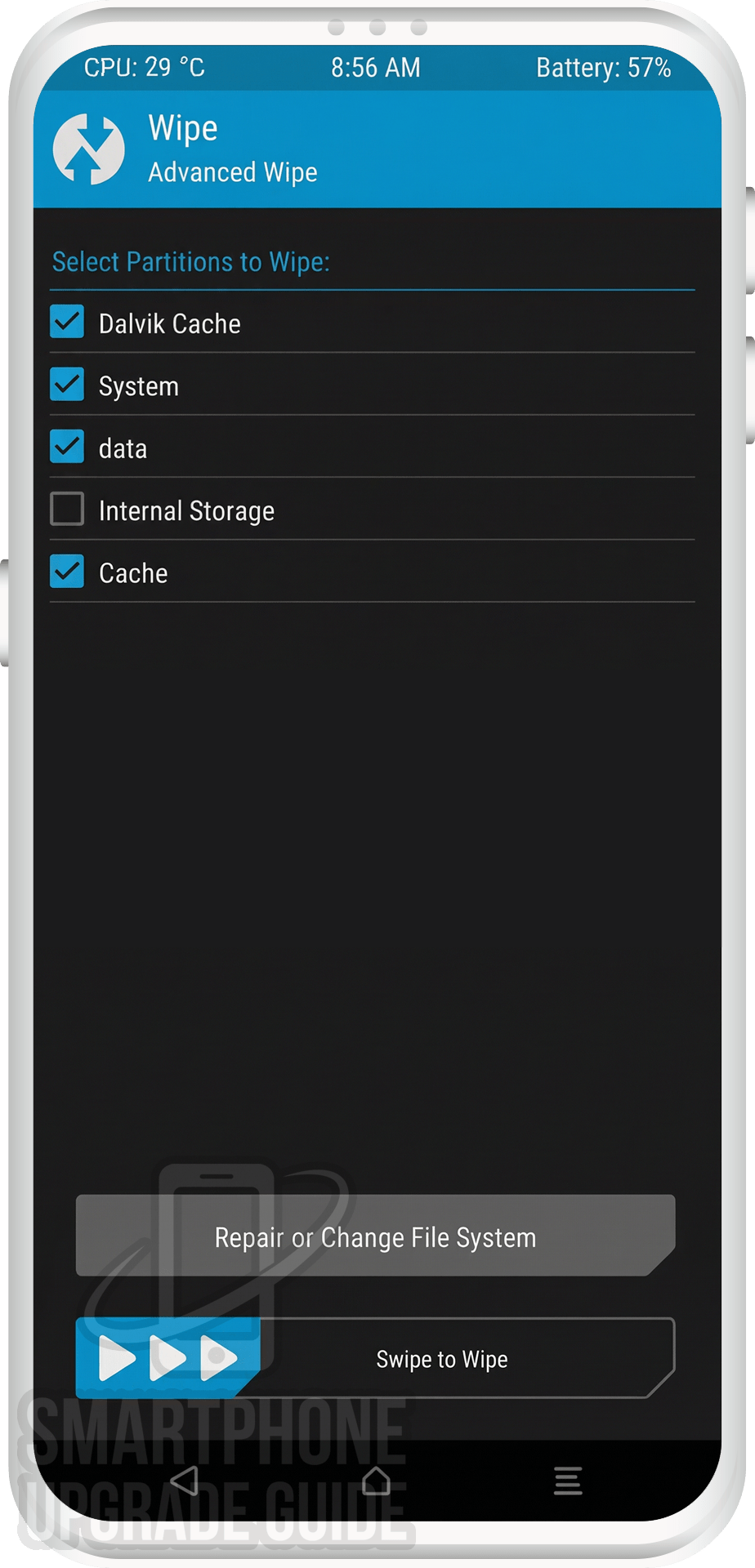
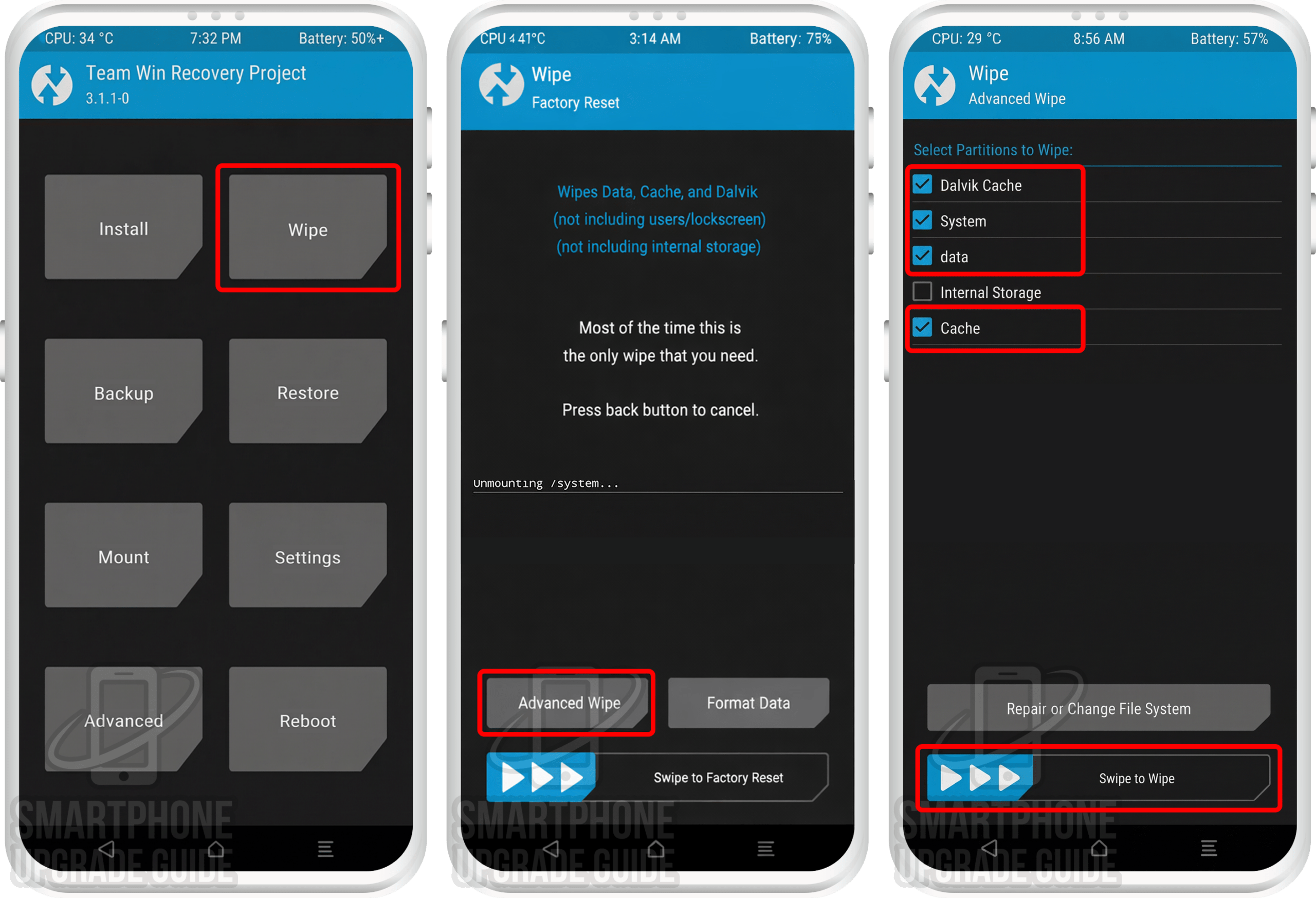
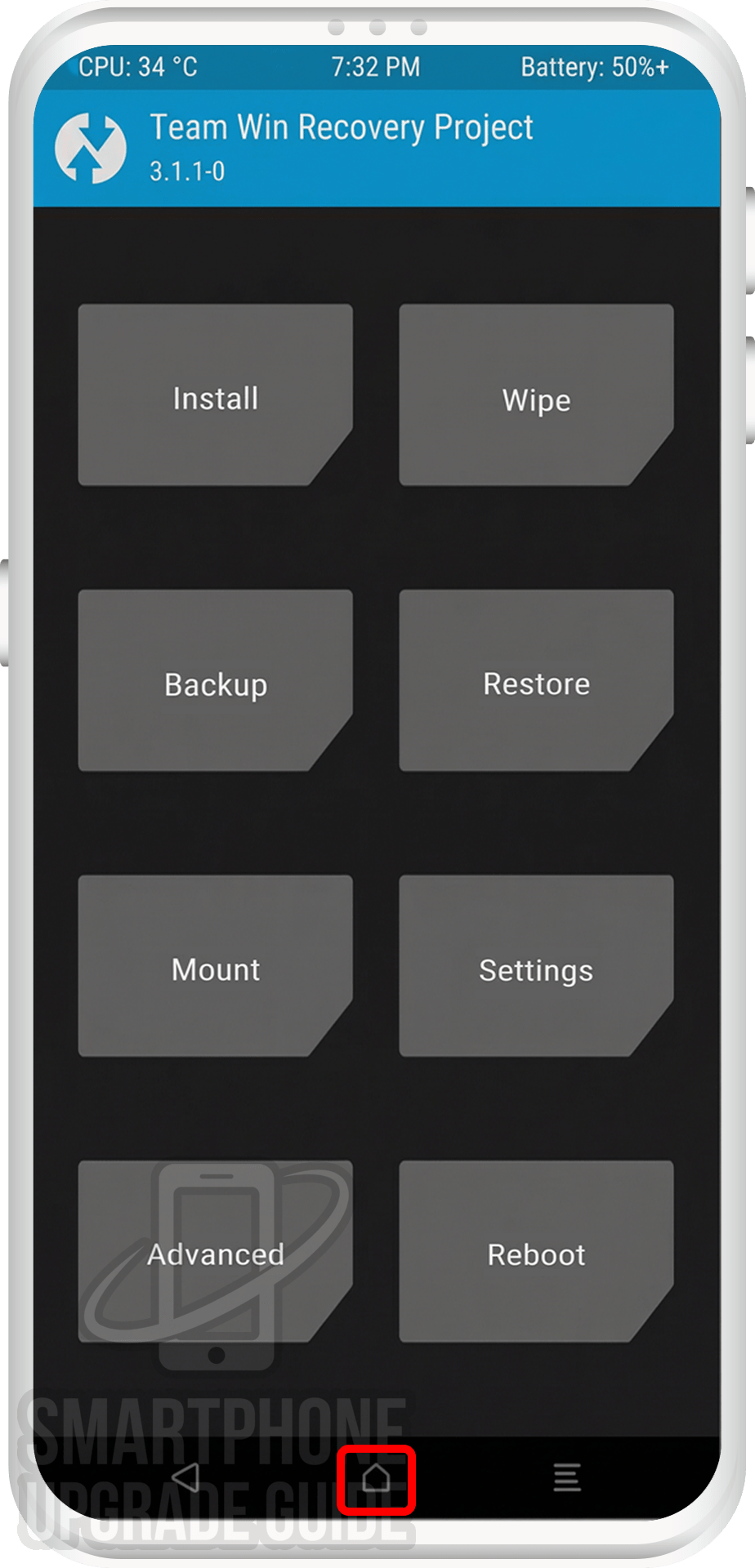
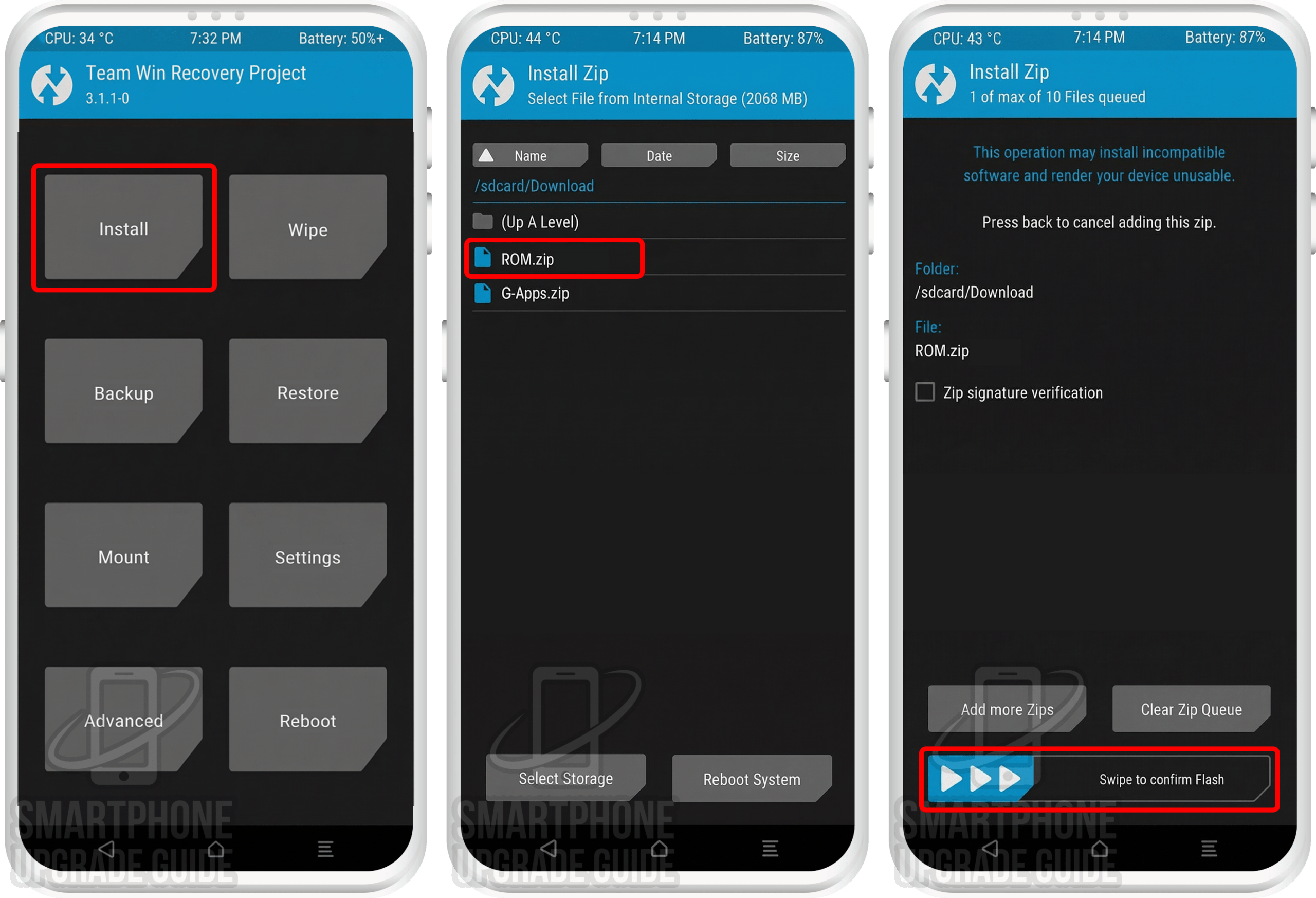
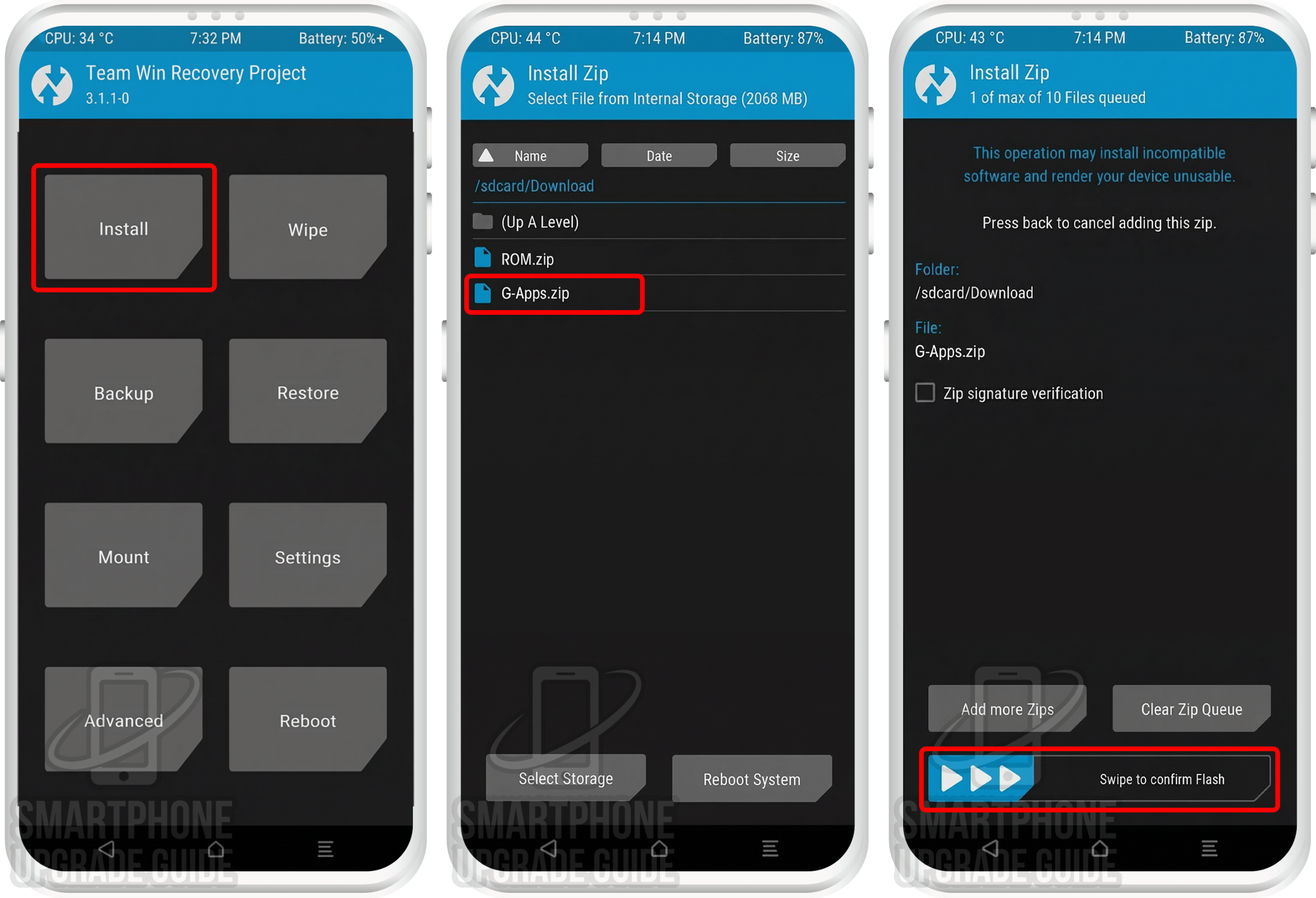
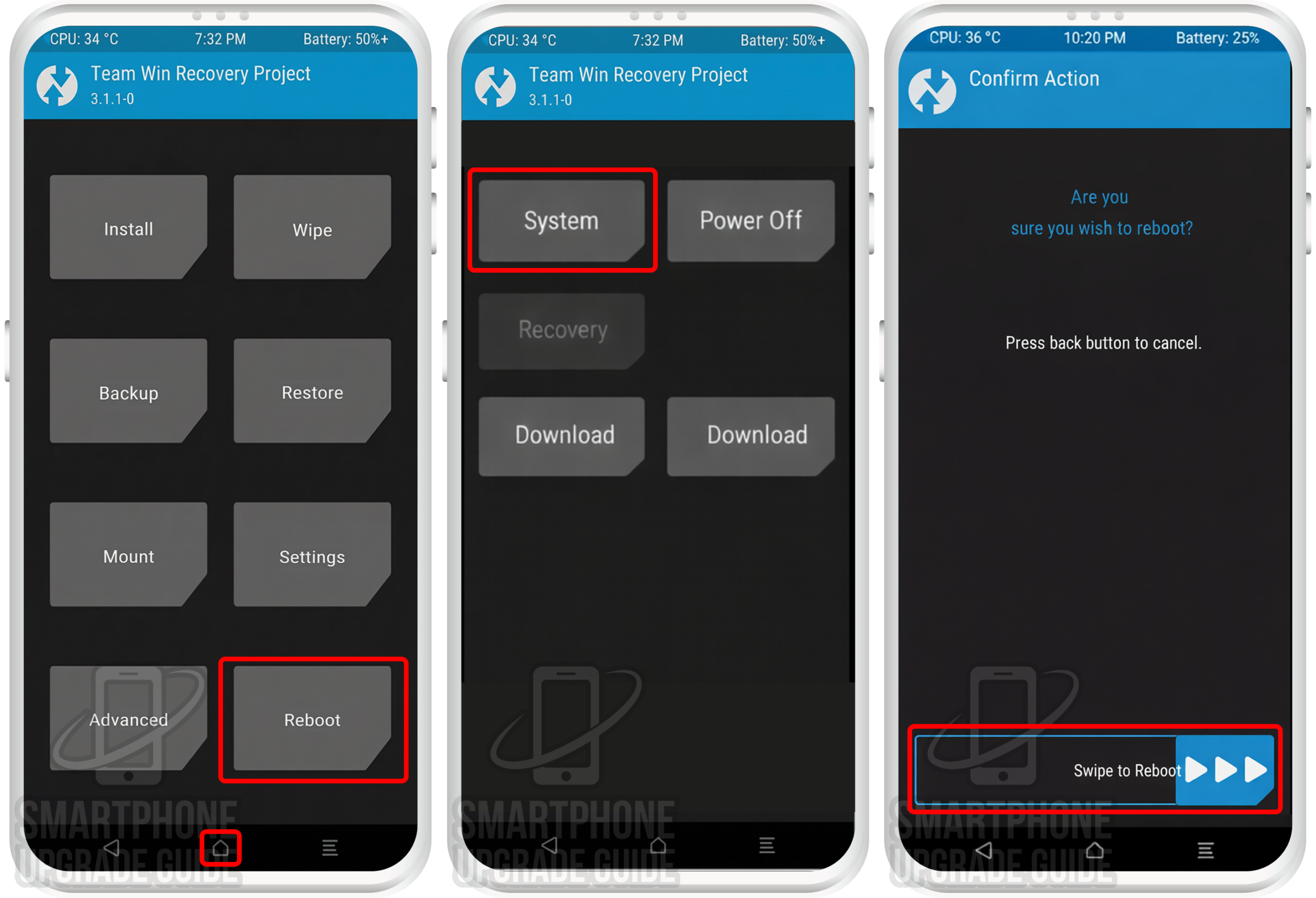
Android 14 Successfully Installed on Your Mi Mix 2S!
Congratulations! You’ve successfully installed Android 14 (Pixel Experience ROM) on your Mi Mix 2S. Enjoy the latest Android features, improved performance, enhanced security, and a clean stock Android experience on your refreshed device!
What’s Working & Not Working on Android 14 (Mi Mix 2S)
Based on the XDA Forum thread and community reports, here’s the current status of features on the Pixel Experience ROM (Android 14) ROM for the Mi Mix 2S. Note: This may vary between builds, so always check the latest forum post.
Working
- ✅ Phone calls & SMS
- ✅ Wi-Fi & Hotspot
- ✅ Mobile data (4G LTE)
- ✅ Bluetooth & audio
- ✅ Camera (photo & video)
- ✅ GPS & location
- ✅ Fingerprint sensor
- ✅ NFC
Known Issues
- ⚠️ Minor camera quirks in some modes
- ⚠️ Some hardware features may vary by build
Always check the XDA Forum thread (1) | XDA Forum thread (2) for the most up-to-date bug list for your specific build version.
Troubleshooting Common Issues
🔄 Stuck on Boot Animation (Bootloop)
If your Mi Mix 2S is stuck on the boot animation for more than 15 minutes, it may be bootlooping. Reboot into TWRP (Power + Vol Up), perform a full wipe (System, Data, Cache, Dalvik), and re-flash the ROM and GApps. Make sure you’re using compatible GApps for Android 14 arm64.
❌ “Error 7” or “Zip Verification Failed”
This usually means you’re flashing a ROM not built for your device. Double-check that the ROM zip is specifically for the Mi Mix 2S. Also ensure your TWRP version is up-to-date and compatible with Android 14 ROMs.
📱 No Mobile Data or Signal After Installation
You may need to flash the correct firmware (baseband/modem) before installing the ROM. Check the XDA Forum thread for the recommended firmware version for your build of Pixel Experience ROM.
🔙 How to Restore Back to Stock ROM
If you want to go back to the stock ROM: (1) restore your Nandroid Backup via TWRP → Restore, or (2) download the official stock ROM from the manufacturer and flash it using the appropriate flash tool on your PC. This will completely restore your Mi Mix 2S to factory stock condition.
Frequently Asked Questions — Android 14 on Mi Mix 2S
Here are answers to the most commonly asked questions about installing and using Android 14 (Pixel Experience ROM) on the Mi Mix 2S:
Is the Android 14 ROM for Mi Mix 2S stable enough for daily use?
The Pixel Experience ROM (Android 14) ROM for the Mi Mix 2S is an unofficial build. Core features — including phone calls, Wi-Fi, mobile data, camera, Bluetooth, GPS, and the fingerprint scanner — work well in most builds. Some minor bugs may exist depending on the build version. We recommend checking the XDA Forum thread (1) | XDA Forum thread (2) for the latest known issues before installing it as your daily driver.
Will installing a custom ROM void my Mi Mix 2S warranty?
Yes, unlocking the bootloader and installing a custom ROM voids the manufacturer warranty. However, since the Mi Mix 2S was released in September 2019, virtually all units are well past their warranty period, so this shouldn’t be a concern for most users.
Can I go back to stock ROM after installing Android 14 on my Mi Mix 2S?
Absolutely. You have two options: (1) Restore your Nandroid Backup through TWRP Recovery to return to your exact previous ROM state, or (2) Download the official stock ROM from the manufacturer’s website and flash it using the appropriate flash tool to perform a clean restore to stock firmware.
Which GApps package should I use with Android 14 on Mi Mix 2S?
You can choose from four popular options: LiteGApps (recommended for minimal footprint), NikGApps (offers granular control over which Google apps to install), MindTheGApps (balanced package), or BiTGapps (lightweight alternative). All must be the ARM64 variant for Android 14 (API 34). Read our complete GApps compatibility guide to choose the best option for your needs.
Do I need an unlocked bootloader to install Android 14 on Mi Mix 2S?
Yes, an unlocked bootloader is a mandatory prerequisite. Without it, you cannot install TWRP Recovery or flash any custom ROM. Use the manufacturer’s official unlock tool to request a bootloader unlock. The process typically involves a waiting period before the unlock is approved.
Does the Android 14 ROM support the Mi Mix 2S’s fingerprint scanner?
Yes, in most Pixel Experience ROM builds for the Mi Mix 2S, the fingerprint scanner works correctly. However, functionality can occasionally vary between different build versions. If the fingerprint scanner isn’t working after installation, try updating to the latest build or check the XDA Forum for any required patches.
How do I update the Android 14 ROM on my Mi Mix 2S after installation?
To update to a newer build of Pixel Experience ROM: Download the latest ROM zip from the LineageOS download page, transfer it to your device, reboot into TWRP, and flash the new ROM zip over the existing installation (this is called a “dirty flash”). Then wipe cache/dalvik and reboot. A full data wipe is usually not needed for minor updates, but always check the XDA thread for update-specific instructions.
Is the Xiaomi Mi CC9 the same as the Mi Mix 2S for custom ROM installation?
Yes, the Xiaomi Mi CC9 and Mi Mix 2S are the same hardware device sold under different names in different regions. The Mi CC9 was the Chinese variant, while the Mi Mix 2S was the global/international variant. Both use the exact same ROM, TWRP recovery, firmware, and kernel files. You can follow this same guide for either device.
Have questions or ran into issues while installing Android 14 on your Mi Mix 2S? Drop a comment below and we’ll help you out! You can also get support from the XDA Forum community (1) | XDA Forum community (2) where the ROM developer and experienced users actively respond to questions.