Camera2 API is essential for Android devices to unlock the full potential of their camera hardware. It enables compatibility with powerful mods like the Google Camera Port and the Nokia Camera app. In this guide, you will learn what Camera2 API is and exactly how to check Camera2 API support on your Android device — in just a few simple steps.
What is Camera2 API?
Camera2 API is an Application Programming Interface created by Google and introduced in Android 5.0 Lollipop. It gives app developers direct access to your phone’s camera hardware, allowing fine control over settings like shutter speed, ISO, autofocus, and RAW image capture.
With Camera2 API enabled, your smartphone can unlock advanced photography features like HDR, manual exposure control, and per-frame adjustments of the sensor, lens, and flash. This is what allows third-party camera apps like the Google Camera Port to deliver impressive results on non-Pixel devices.
For a deeper technical understanding, you can refer to the official Camera2 API documentation by Google.
How to Check Camera2 API Support on Android
Android doesn’t provide a built-in way to check Camera2 API support. Instead, you can use a free app called Camera2 API Probe that scans your hardware and reports the exact support level for each camera sensor. Follow these three steps:
Step 1: Install the Camera2 API Probe App
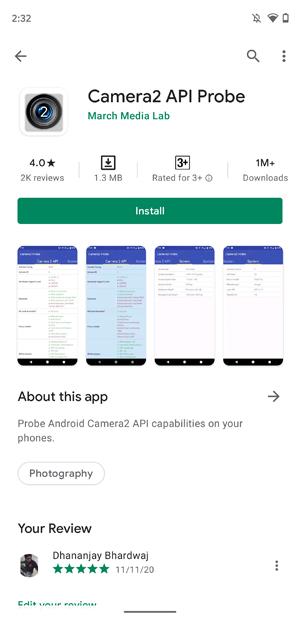
Your phone’s stock camera app or system settings will not tell you whether Camera2 API is supported. For this purpose, we recommend Camera2 API Probe by March Media Lab — the most accurate and reliable app we tested across multiple OEM devices running different versions of Android.
Download and install it from the Google Play Store using the button below:
Step 2: Open the App and Review Your Camera Info
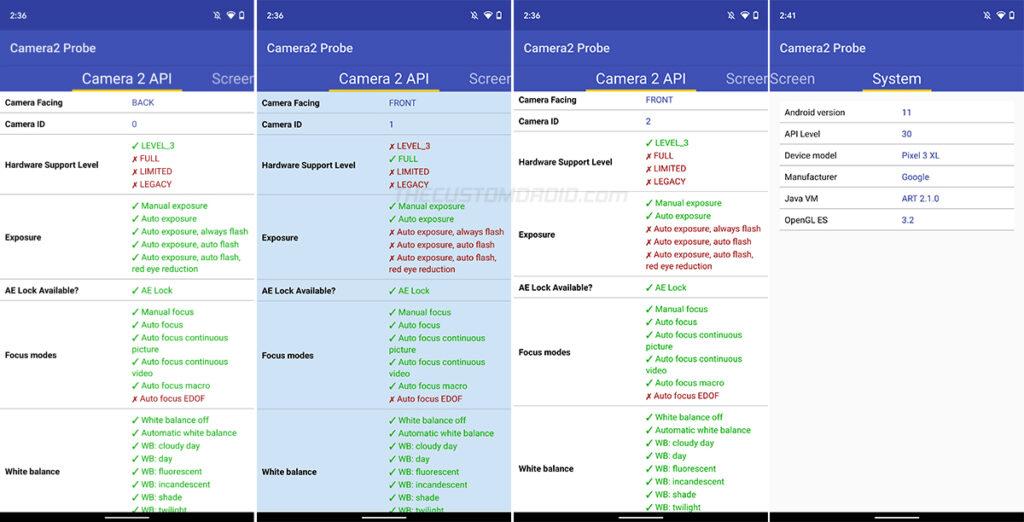
After installing, launch the Camera2 API Probe app from your app drawer. It will instantly display detailed hardware information for every camera sensor on your device, organized by Camera ID.
If your device has more than two cameras, additional Camera IDs will appear for each sensor. The app also shows general device information and the current Android OS version in a separate section.
Step 3: Understand the Camera2 API Support Levels
Under each Camera ID, look for the “Hardware Level Support” category. This tells you exactly what level of Camera2 API implementation your device has. According to the official documentation, there are four possible support levels:
- 🟢 Level-3 (Highest) — The device manufacturer has added extra capabilities including YUV reprocessing, RAW image capture, and additional OEM-specific features. This is the best possible Camera2 API support level.
- 🔵 Full — Your smartphone fully supports all major Camera2 API capabilities. Works great with Google Camera Port and other advanced camera apps.
- 🟡 Limited — Only some Camera2 API features are available on your device. Third-party camera apps may work but with reduced functionality.
- 🔴 Legacy — No Camera2 API support at all. Your device only supports the older Camera1 API, which means advanced camera mods will not work.
💡 How to read the results: A green tick (✓) means a feature is supported, while a red cross (✗) means it is not. Keep in mind that some phones like the Xiaomi Mi A1 and Mi A2/A2 Lite have Camera2 API disabled by the manufacturer even though the hardware supports it. On these devices, you may need to enable Camera2 API by rooting the phone.
Frequently Asked Questions
Here are answers to the most common questions about Camera2 API support on Android devices.
Is Camera2 API available on all Android devices?
Not necessarily. Camera2 API was introduced in Android 5.0 Lollipop, so devices running older Android versions do not support it. Even among newer phones, the level of support varies — some have Full support while others are Limited or Legacy. The best way to find out is by using the Camera2 API Probe app described above.
Can I enable Camera2 API if my phone doesn’t support it?
In some cases, yes. Certain manufacturers like Xiaomi disable Camera2 API at the software level even though the hardware is capable. On these devices, you can enable it by rooting the phone and modifying system properties. However, if your device shows “Legacy” level support, the hardware itself lacks the capability and it cannot be enabled through software.
Do I need Camera2 API for Google Camera Port?
Yes. Google Camera Port (GCam) requires at least Limited-level Camera2 API support to function. For the best experience — including features like Night Sight, HDR+, and astrophotography mode — Full or Level-3 support is recommended.
Conclusion
You now know what Camera2 API is and exactly how to check Camera2 API support on any Android device. Whether you are trying to install the Google Camera Port or simply want to understand your phone’s camera capabilities, the Camera2 API Probe app makes the process quick and straightforward.
Camera2 API is a great example of how much software matters when it comes to getting the best photos from your Android phone’s hardware. If you have any questions or run into issues, feel free to let us know in the comments below.